<body> <div data-elementor-type="wp-post" data-elementor-id="335" class="elementor elementor-335">
<div class="elementor-element elementor-element-4fefe134 e-flex e-con-boxed e-con e-parent" data-id="4fefe134" data-element_type="container" data-e-type="container">
<div class="e-con-inner">
<div class="elementor-element elementor-element-22f7f27d elementor-widget elementor-widget-text-editor" data-id="22f7f27d" data-element_type="widget" data-e-type="widget" data-widget_type="text-editor.default">
<div class="elementor-widget-container">
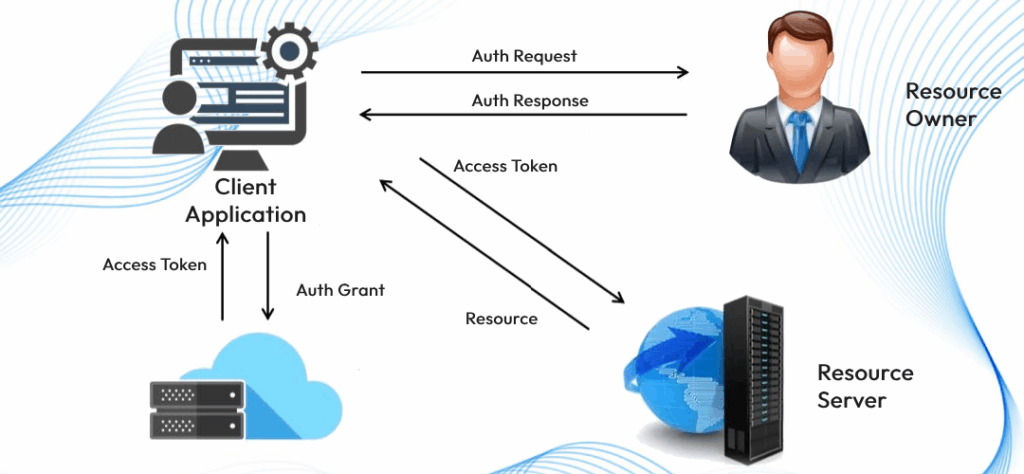
<p><strong>OAuth 2.0</strong> can seem intimidating to new learners, especially with its multi-step processes and terminology. However, understanding how it works is crucial for modern web and mobile applications, as it provides a secure and flexible way for users to grant access to their data without sharing their passwords. The flow can often feel complex at first glance, but the diagram attached simplifies it into easy-to-follow steps, illustrating how the client, authorization server, and resource server interact to ensure safe access.</p>
<p><!-- /wp:paragraph --><!-- wp:paragraph --></p>
<p>This guide will walk you through the OAuth 2.0 process step by step, breaking down each part of the image, so you can grasp the essentials and gain a solid understanding of how OAuth 2.0 works in practice. Whether you’re a developer, tech enthusiast, or just someone curious about how secure access is managed in today’s applications, this guide will help demystify the process.</p>
<p><!-- /wp:paragraph --><!-- wp:image {"id":344,"sizeSlug":"large","linkDestination":"none"} --></p>
<figure class="wp-block-image size-large"><img class="wp-image-344" src="https://docs.metamorphtech.com/wp-content/uploads/2025/05/oauth-2-1-1024x474.png" alt="" loading="lazy"></figure>
<p><!-- /wp:image --><!-- wp:paragraph --></p>
<p>Here’s a step-by-step explanation of the process:</p>
<p><!-- /wp:paragraph --><!-- wp:heading {"level":3} --></p>
<p><span style="text-decoration: underline;"><b>1. Authorization Grant (A)</b></span></p>
<p><!-- /wp:heading --><!-- wp:list --></p>
<ul class="wp-block-list">
<li style="list-style-type: none;">
<ul class="wp-block-list"><!-- wp:list-item --></ul>
</li>
</ul>
<ul class="wp-block-list">
<li style="list-style-type: none;">
<ul class="wp-block-list">
<li><strong>Client</strong>: The application (client) sends a request to the <strong>Authorization Server</strong> to obtain permission to access resources.</li>
</ul>
</li>
</ul>
<p><!-- /wp:list-item --><!-- wp:list-item --></p>
<ul class="wp-block-list">
<li style="list-style-type: none;">
<ul class="wp-block-list">
<li><strong>Authorization Server</strong>: After the user provides consent, the authorization server returns an <strong>Authorization Grant</strong> to the client, which is a temporary code used to obtain access tokens.</li>
</ul>
</li>
</ul>
<p><!-- /wp:list-item --></p>
<p><!-- /wp:list --><!-- wp:heading {"level":3} --></p>
<p class="wp-block-heading"><span style="text-decoration: underline;"><b>2. Access Token and Refresh Token (B)</b></span></p>
<p><!-- /wp:heading --><!-- wp:list --></p>
<ul class="wp-block-list">
<li style="list-style-type: none;">
<ul class="wp-block-list"><!-- wp:list-item --></ul>
</li>
</ul>
<ul class="wp-block-list">
<li style="list-style-type: none;">
<ul class="wp-block-list">
<li>The client sends the authorization grant to the authorization server, which then issues an <strong>Access Token</strong> and an optional <strong>Refresh Token</strong>.</li>
</ul>
</li>
</ul>
<p><!-- /wp:list-item --><!-- wp:list-item --></p>
<ul class="wp-block-list">
<li style="list-style-type: none;">
<ul class="wp-block-list">
<li><strong>Access Token</strong>: Used to make requests to the resource server for accessing protected resources.</li>
</ul>
</li>
</ul>
<p><!-- /wp:list-item --><!-- wp:list-item --></p>
<ul class="wp-block-list">
<li style="list-style-type: none;">
<ul class="wp-block-list">
<li><strong>Refresh Token</strong>: Used to obtain a new access token once the current access token expires.</li>
</ul>
</li>
</ul>
<p><!-- /wp:list-item --></p>
<p><!-- /wp:list --><!-- wp:heading {"level":3} --></p>
<p class="wp-block-heading"><span style="text-decoration: underline;"><b>3. Accessing Protected Resources (C & D)</b></span></p>
<p><!-- /wp:heading --><!-- wp:list --></p>
<ul class="wp-block-list">
<li style="list-style-type: none;">
<ul class="wp-block-list"><!-- wp:list-item --></ul>
</li>
</ul>
<ul class="wp-block-list">
<li style="list-style-type: none;">
<ul class="wp-block-list">
<li><strong>Client</strong>: The client uses the access token to request protected resources from the <strong>Resource Server</strong>.</li>
</ul>
</li>
</ul>
<p><!-- /wp:list-item --><!-- wp:list-item --></p>
<ul class="wp-block-list">
<li style="list-style-type: none;">
<ul class="wp-block-list">
<li><strong>Resource Server</strong>: The resource server validates the access token and grants the client access to the requested resources (like user data).</li>
</ul>
</li>
</ul>
<p><!-- /wp:list-item --></p>
<p><!-- /wp:list --><!-- wp:heading {"level":3} --></p>
<p class="wp-block-heading"><span style="text-decoration: underline;"><b>4. Token Expiry and Invalid Token Error (E & F)</b></span></p>
<p><!-- /wp:heading --><!-- wp:list --></p>
<ul class="wp-block-list">
<li style="list-style-type: none;">
<ul class="wp-block-list"><!-- wp:list-item --></ul>
</li>
</ul>
<ul class="wp-block-list">
<li style="list-style-type: none;">
<ul class="wp-block-list">
<li><strong>Access Token Expiration</strong>: Access tokens have a limited lifespan for security reasons. Once it expires, if the client tries to access the resource with an expired token, the <strong>Resource Server</strong> will return an <strong>Invalid Token Error</strong>.</li>
</ul>
</li>
</ul>
<p><!-- /wp:list-item --></p>
<p><!-- /wp:list --><!-- wp:heading {"level":3} --></p>
<p class="wp-block-heading"><span style="text-decoration: underline;"><b>5. Refreshing Access Token (G & H)</b></span></p>
<p><!-- /wp:heading --><!-- wp:list --></p>
<ul class="wp-block-list">
<li style="list-style-type: none;">
<ul class="wp-block-list"><!-- wp:list-item --></ul>
</li>
</ul>
<ul class="wp-block-list">
<li style="list-style-type: none;">
<ul class="wp-block-list">
<li><strong>Client</strong>: The client can use the <strong>Refresh Token</strong> to request a new access token from the authorization server.</li>
</ul>
</li>
</ul>
<p><!-- /wp:list-item --><!-- wp:list-item --></p>
<ul class="wp-block-list">
<li style="list-style-type: none;">
<ul class="wp-block-list">
<li><strong>Authorization Server</strong>: If the refresh token is valid, the server provides a new access token (and possibly a new refresh token) without requiring the user to re-authenticate.</li>
</ul>
</li>
</ul>
<p><!-- /wp:list-item --></p>
<p><!-- /wp:list --><!-- wp:heading {"level":3} --></p>
<p class="wp-block-heading"><span style="text-decoration: underline;"><b>Key Takeaways:</b></span></p>
<p><!-- /wp:heading --><!-- wp:list --></p>
<ul class="wp-block-list">
<li style="list-style-type: none;">
<ul class="wp-block-list"><!-- wp:list-item --></ul>
</li>
</ul>
<ul class="wp-block-list">
<li style="list-style-type: none;">
<ul class="wp-block-list">
<li><strong>Access Token</strong>: Short-lived token that provides access to the protected resources.</li>
</ul>
</li>
</ul>
<p><!-- /wp:list-item --><!-- wp:list-item --></p>
<ul class="wp-block-list">
<li style="list-style-type: none;">
<ul class="wp-block-list">
<li><strong>Refresh Token</strong>: Long-lived token that allows refreshing an expired access token without re-authorization.</li>
</ul>
</li>
</ul>
<p><!-- /wp:list-item --><!-- wp:list-item --></p>
<ul class="wp-block-list">
<li style="list-style-type: none;">
<ul class="wp-block-list">
<li><strong>Authorization Server</strong>: Issues and validates tokens.</li>
</ul>
</li>
</ul>
<p><!-- /wp:list-item --><!-- wp:list-item --></p>
<ul class="wp-block-list">
<li style="list-style-type: none;">
<ul class="wp-block-list">
<li><strong>Resource Server</strong>: Hosts the protected resources and verifies the access token’s validity.</li>
</ul>
</li>
</ul>
<p><!-- /wp:list-item --></p>
<p><!-- /wp:list --><!-- wp:paragraph --></p>
<p>This step-wise OAuth 2.0 process ensures that secure access to resources is maintained, reducing the risk of security breaches by not exposing sensitive user credentials to third-party applications.</p>
<p><!-- /wp:paragraph --><!-- wp:paragraph --></p>
<p><!-- /wp:paragraph --></p> </div>
</div>
</div>
</div>
</div>
</body>